If you own or manage a local business in Nigeria, finding a steady stream of paying customers can feel like a constant battle. Relying on walk-ins or posting randomly on social media rarely brings predictable income.
Small businesses make up 96% of all businesses and provide 84% of employment in the country. Yet, many struggle to survive because they cannot connect with local buyers.
But your local customers are online, scrolling through their phones every single day. The best way to reach them is through Meta ads.
This guide will show you exactly how to run Facebook ads to get local customers, using a simple, step-by-step framework in Meta Ads Manager.
What are Meta Ads and Meta Ads Manager?
Before launching a campaign, it helps to understand what Facebook Ads are and how the ecosystem works. “Meta ads” is simply the umbrella term for any advertisement that runs across Facebook, Instagram, Messenger, and Meta’s partner apps.
To create these ads, you should never use the simple “Boost Post” button on your phone. It limits your options and wastes your budget.
Instead, you need to use Meta Ads Manager, which is Meta’s professional dashboard. This tool allows you to control exactly who sees your ad, where your money is spent, and how you collect leads.
You can access it on desktop via the Ads Manager, you can also access it via the Meta Ads Manager App on mobile or through your Ads Manager settings on Meta Business Suite.
Step 1: Set Up Your Campaign Objective
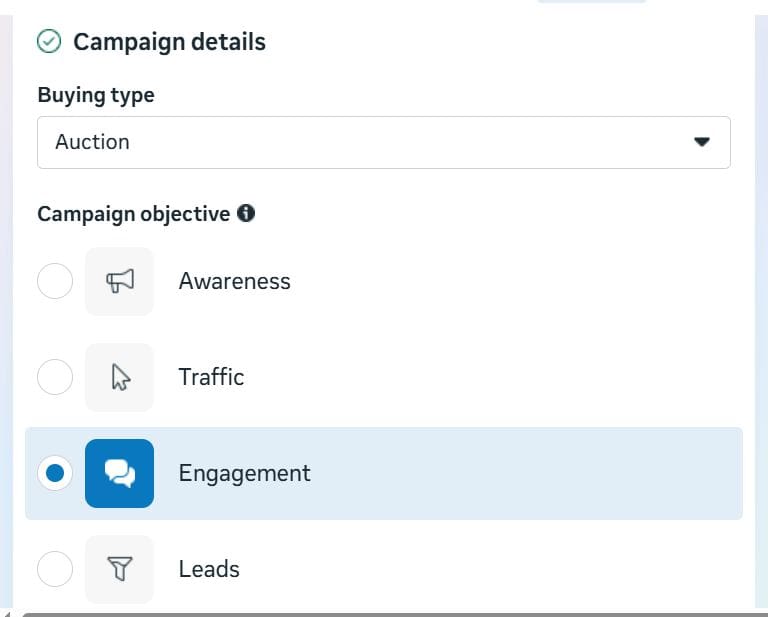
To start learning how to do Facebook ads, log into your Meta Ads Manager account and click the green “Create” button. Meta will ask you to choose a campaign objective.
For local service businesses, choosing the Leads or Engagement objective is highly effective, especially when set to route to a messaging platform like WhatsApp.
This structure ensures that when a local customer clicks your ad, a chat window opens directly on their phone, allowing them to book an appointment immediately.
Step 2: Set Ad Budget & Category
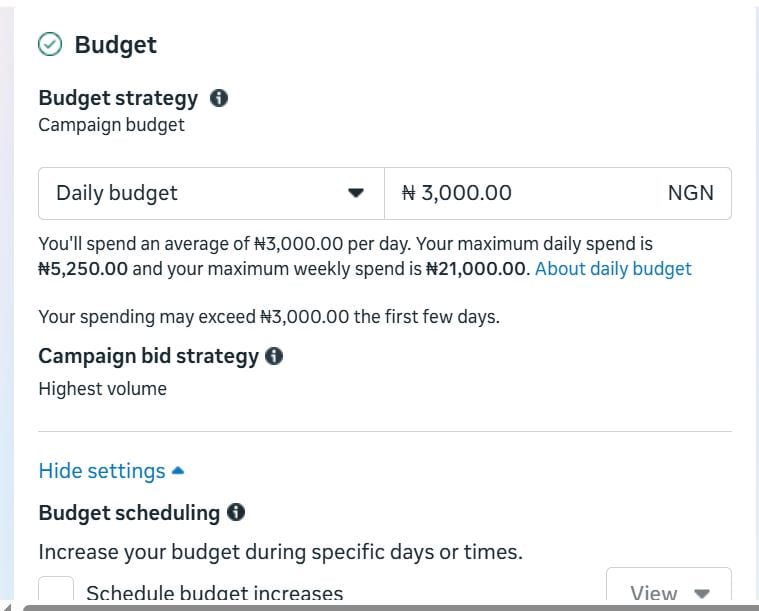
When deciding how to allocate your money in Meta Ads Manager, you must choose between a daily budget or a lifetime budget at the ad set level.
For local businesses operating on a lean scale, starting with a daily budget of ₦3,000 to ₦5,000 is an excellent way to test the market without overextending your finances.
This approach gives you full control, allowing you to monitor the performance of your local neighborhood pins every twenty-four hours and pause the campaign if necessary.
If you prefer to set a strict spending cap for a specific window, such as a ₦12,000 budget capped firmly over a four-day holiday promotion, selecting a lifetime budget ensures that Meta automatically distributes the funds smoothly across that exact timeline and never spends a single Naira over your specified limit.
Whichever option you choose, keeping your initial budget controlled ensures you can gather valuable customer conversion data without requiring an enterprise-level investment.
In addition, if your ads relate to financial products and services, employment, housing, social issues, elections, or politics, Meta expects you to declare them to help prevent ad rejections.
Step 3: Choose the Right Conversion Location and Set Your Performance Goal
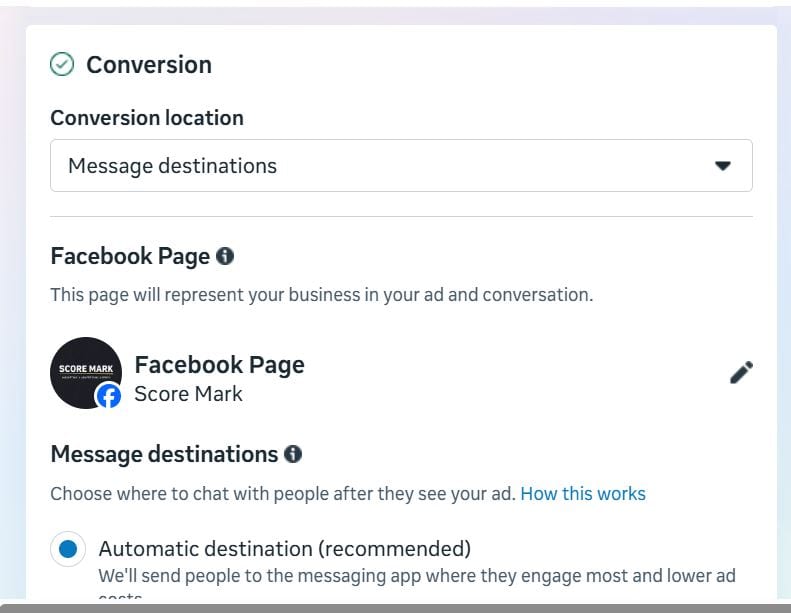
Before writing your ad text, you must tell Meta exactly where you want the customer journey to take place by selecting your conversion location.
For local service enterprises looking to drive immediate bookings, choosing messaging apps as your conversion location is the most direct path to a sale.
This setting skips complex website setups and routes interested local prospects straight into your WhatsApp, Messenger, or Instagram chat architecture the moment they click your visual creative.
Once your conversion location is locked in, navigating down to the performance goal section requires a strategic choice.
Meta will offer several optimization filters, but you should select “Maximize number of conversions” or “Maximize number of link clicks,” depending on how you want the algorithm to behave.
Step 4: Configure Your Local Location and Age Controls
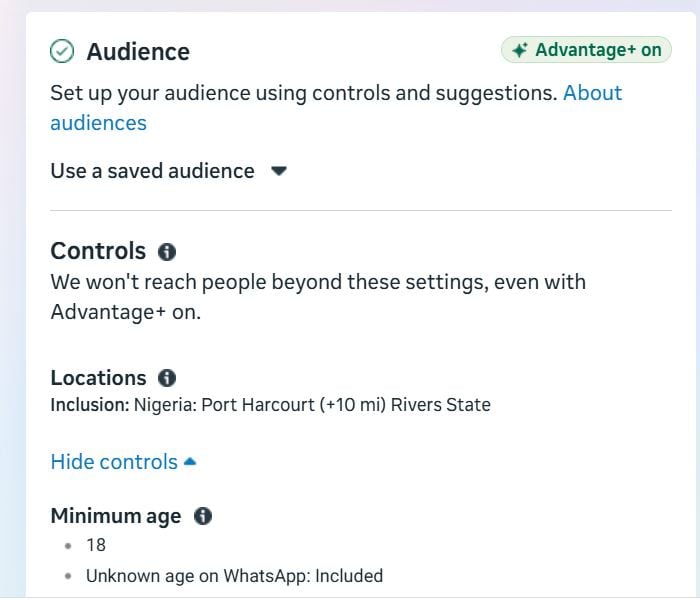
The core secret to a successful local campaign lies within the Ad Set level targeting settings. You do not need a massive enterprise-level budget to see great results. In fact, local campaigns can yield remarkable volume on a lean budget, such as ₦15,000 over six to seven days, if your targeting is properly configured.
First, set your location parameters. Avoid targeting an entire city if your customers only travel a short distance to visit you. Instead, use specific map pins to target your exact neighborhood, such as dropping a pin directly over Elelenwo in Port Harcourt with a tight 5-to-7 mile radius.
Second, set your age brackets. For most local service businesses, adjusting the age selection to target adults between 22 and 55 years old is ideal. This range focuses your ad spend on individuals who possess independent disposable income and are ready to buy.
Step 5: Try Open Targeting for Local Reach
A common mistake when learning how to run Facebook ads is stacking too many interest keywords into the targeting box. When you target a small, 5-mile geographical radius and then add multiple interest constraints, your audience size becomes too small, driving up your costs.
Instead, try Open Targeting by leaving the interest box completely blank. By removing interest tags, you allow Meta’s algorithm to look strictly at your local geographic circle, your 22-55 age bracket, and the visual elements of your ad creative.
The algorithm will naturally deliver the ad to neighborhood residents who show an interest in your industry. Just be mindful of how you go about the automated, detailed targeting expansion feature so Meta respects your defined local boundaries and does not expand your reach outside your target area to spend your budget.
Related Article: Meta Ad Case Study: How I Got 30 Local Leads with N12,000
Step 6: Optimize Across Placements
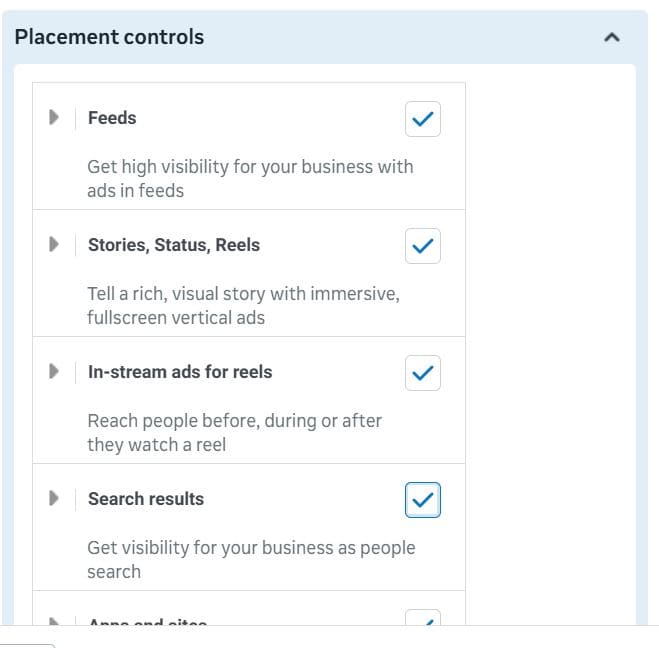
Once your ad goes live, Meta’s system distributes it across various placements, including Facebook Reels, Facebook Mobile Feeds, and Instagram Feeds.
Reviewing real-world placement metrics often reveals that short-form video placements, like Facebook Reels, generate the highest overall volume of new message conversations for local businesses.
However, looking closer at the data frequently reveals that Instagram placements can yield a significantly higher click-through rate and a lower cost per lead.
This variance happens because Meta’s delivery optimization naturally favors the larger, immediate user base on Facebook during the initial hours of a campaign, which can occasionally limit the ad exposure sent to a highly responsive Instagram audience.
When you want to improve your results, consider duplicating your campaign into two distinct ad sets: leave one set to handle broad Facebook volume, and set the other to target Instagram placements exclusively to capture those highly efficient conversions.
Step 7: Set Up Your Ad Creative
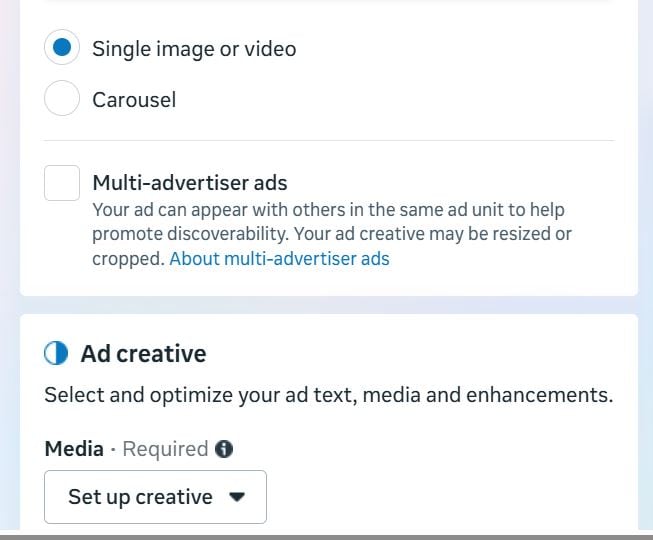
The visual component of your campaign acts as the primary filter for catching the eye of busy, scrolling neighbors.
For local service storefronts, using raw, high-quality smartphone video assets of your team in action consistently outperforms heavily edited corporate graphics.
Within the ad setup panel, upload your media files and draft a single, clear text script in the Primary Text box that highlights your specific services, your neighborhood location, and a direct call to action.
To maintain a highly efficient setup, ensure your chosen headline clearly reinforces your core offer and pair it with a “Send Message” call to action button so local prospects know exactly how to reach out and initiate a booking session with your team.
Also, applying Meta’s Advantage Plus feature, such as adding an AI-generated image of your ad to accompany the video, might prove helpful.
Step 8: Handle the Chat Builder Setup
When setting up a messaging ad, Meta will prompt you to create a message template using its interactive chat builder.
To keep things straightforward and reliable, you can choose the standard Start Conversation layout instead of advanced forms.
This setup lets you type your greeting and questions into a single text block, ensuring your audience sees everything clearly on one page without hidden navigation tabs. Afterwards, you’re now ready to hit the publish button!
Final Take
Mastering Meta Ads Manager is no longer an optional marketing tactic for local business owners; it is a fundamental requirement for commercial expansion.
When you transition away from the restrictive boost post button and embrace professional campaign structures, you position your brand directly in front of active local consumers who are ready to buy.
Implementing these steps successfully allows you to transform your digital presence from an unpredictable expense into a systematic customer acquisition machine.
However, configuring the backend settings, managing the layout quirks of the chat builder, and analyzing advanced placement metrics requires time and continuous platform management.
If you are a business owner looking to scale your lead generation, build an automated customer pipeline, and deploy data-driven ad campaigns without the technical stress, let us handle the heavy lifting for you.
Meta ad setup and management is one of the services we offer small and medium-sized businesses in Nigeria. Reach out today at grow@scoremark.com.ng, scoremark3@gmail.com, or use the WhatsApp button on our page. Let’s get started!